ID Photo Maker
Upload a portrait, then choose your size and background.
Upload your image
JPG, PNG, WebP · Max 3 MB each
Upload info & privacy
Upload a portrait, choose a background color and output size, then review and download your photo. Check the receiving organization’s photo rules before use.
No sign-up required. Free use is limited to 5 requests per hour per IP address. Processing time varies with the tool, image, and queue; keep this page open.
Images are processed by RunningHub. Privacy policy.
Real example
White background and a 600 × 600 output
Settings: white background, 600 × 600 pixels. The downloaded image is fitted to the selected dimensions. This demonstration does not establish compliance with official ID-photo requirements.
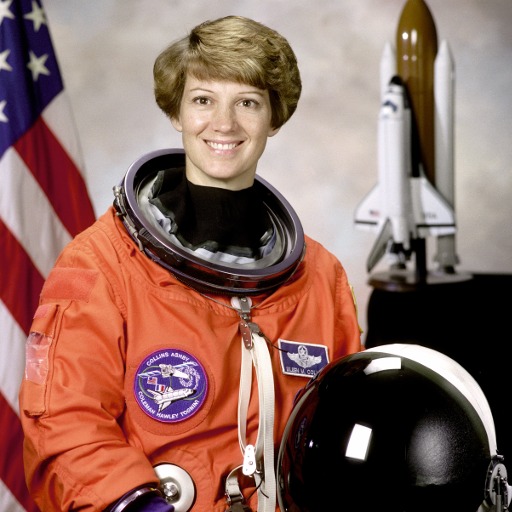 Download full-size image
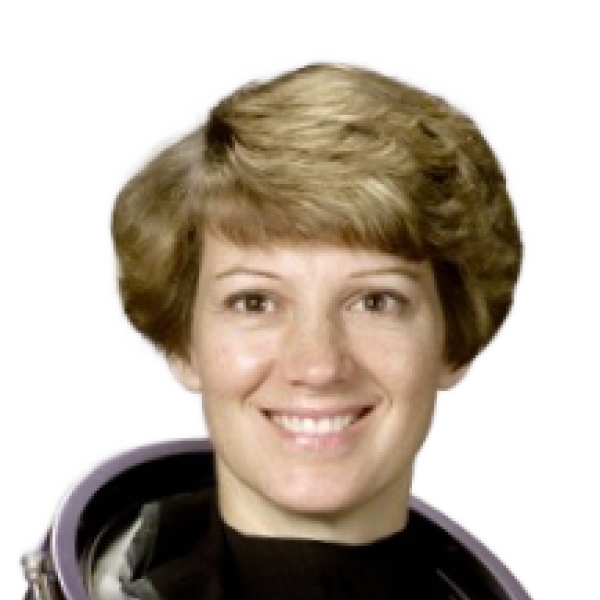 Download full-size image
Processed with PicMelo on October 23, 2026. Select an image to inspect the full-size file.
Source portrait: NASA, via scikit-image (public domain). This is an AI editing demonstration, not an endorsement by the person pictured.
Previews are compressed for faster loading. Open or download the full-size images to inspect the original files.
Take a suitable source photo
- Face the camera directly with a neutral expression unless different guidance applies.
- Use soft, even front lighting and avoid strong shadows on the face or wall.
- Keep hair and shoulders visible against a contrasting background.
- Use the original camera file rather than a screenshot or compressed chat image.
Choose size and background carefully
PicMelo provides common size and color presets, but requirements differ by country, exam, employer, and document type. Check the receiving authority for exact pixel dimensions, head position, clothing rules, background color, and whether digital editing is permitted.
Important notice
This tool creates ID-style photos; it does not issue, verify, or guarantee acceptance of official identity documents. Do not use edited portraits to misrepresent identity or create fraudulent documents.
Camera position and framing
Place the camera at eye level and use enough distance to reduce wide-angle distortion. A phone held very close can make the center of the face appear larger and the ears or sides of the head appear smaller. Ask another person to take the photo or use a stable stand and timer. Keep the head upright, shoulders level, and enough space around the head for later cropping.
Lighting and appearance
Use even light from the front or from two balanced sides. Avoid a bright window directly behind the subject and avoid a single overhead light that creates dark eye sockets. Clothing should contrast with the requested background. Glasses, head coverings, facial expressions, and visible ears may be regulated differently depending on the application, so consult the official instructions rather than relying on a generic example.
Check technical requirements before submission
- Required pixel dimensions or physical print size
- Maximum file size and accepted file format
- Head height and distance from the top edge
- Background color and shadow rules
- Age of the photo and editing restrictions
Changing the background does not guarantee that a photo meets all requirements. The applicant remains responsible for checking the final image against the receiving organization’s current rules.
Final submission checklist
- The photo matches the current official instructions for the exact application.
- The face is in focus, evenly lit, and not hidden by hair or glare.
- The background is uniform and has the required color.
- The crop, head size, pixel dimensions, and file size are correct.
- No edit changes identifying facial features.
Review the downloaded file rather than relying only on the browser preview. Some submission portals recompress images or reject filenames with unusual characters. Keep the original photo and the submitted version until the application is complete.
If the receiving portal rejects the file
Read the error message carefully and adjust only the stated issue. Repeatedly compressing or resizing the same file can reduce quality. When the portal provides no useful explanation, contact the receiving organization because PicMelo cannot determine its private validation rules.
Frequently asked questions
Can I use a selfie?
A selfie may introduce perspective distortion. A photo taken from a little farther away at eye level usually produces a better result.
Which background color should I choose?
Use the exact color requested by the organization. White is common but not universal.
Can I retouch an official ID photo?
Many authorities prohibit changes that alter facial appearance. Background replacement and resizing may also be restricted. Read the official rules before editing.
Why was my photo rejected?
Common reasons include incorrect dimensions, shadows, head position, expression, clothing, file size, or edits that exceed permitted limits. Only the receiving organization can provide the definitive reason.